Responsive HTML5 Video Background - HELP
by Flashtuning - www.flashtuning.net
Table of Contents
- 1. Installation
- 2. Setting the layout
- 3. Local Videos
- 4. Youtube Videos
1. Installation
You only need the examples folder on your server in order to view them.
Please dont place non-minified javascript files on your server.
To start open index.html in any text editor (Dreamweaver is good if you have it, but any plain text editor will do).
There are 2 sections (one in head tag and one in body tag) that you need to copy into your website.
In the head tag you have links to stylesheets and javascript files, and all the settings for the component. In the body part are all the component elements.
Make sure you copy everything from both head and body tags into your web page at appropriate places.
One of the most common errors is duplicating jquery script. If your web page already includes link to jquery script, then DO NOT include it twice!
2. Setting the layout
In the head of the index.html you'll find the following settings:
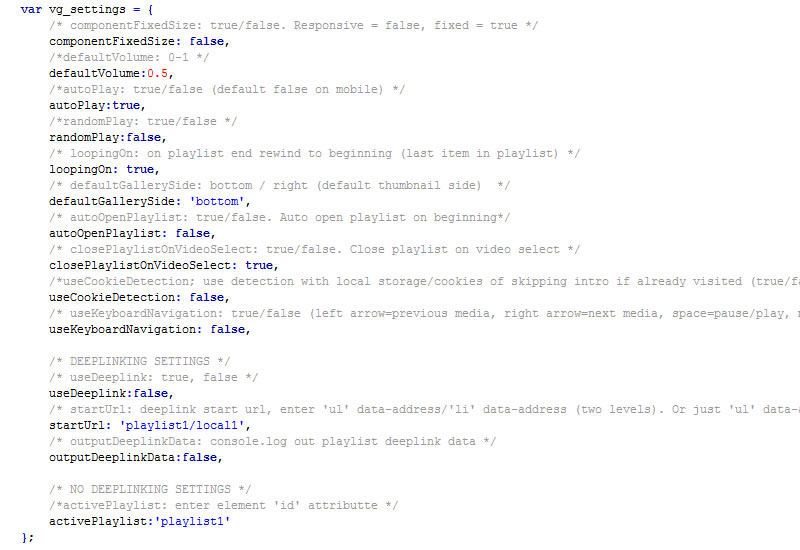
If you want the component to be responsive set the componentFixedSize to false
3. Local Videos
You need to have every video encoded in both mp4 and ogv video format. Thats because some browsers play 'mp4' while other 'ogv' video format.
Example of local playlist:
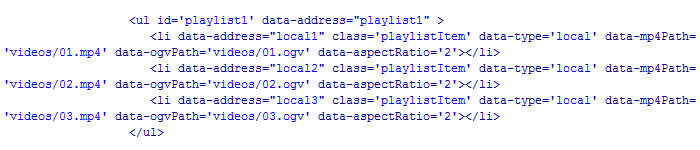
Required attributes:
data-type: local (local playlist, or non youtube video)
data-mp4Path: path to the 'mp4' file
data-ogvPath: path to the 'ogv' file
Optional attribute: data-aspectRatio: 0/1/2 (0=original/1=fit inside/2=fit outside, 2 by default) -> defines size of the video, try setting diferent options to see how it looks like.
4. Youtube Videos
Example of Youtube playlist videos:
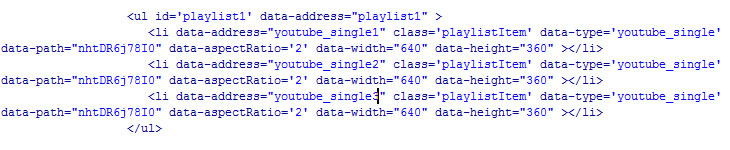
Required attributes:
data-type: youtube_single/youtube_playlist
data-path: path to the video (single video 'id' or playlist 'id')
Optional attributes:
data-aspectRatio: 0/1/2 (0=original/1=fit inside/2=fit outside, 2 by default) -> defines size of the video.
data-width: width of the video (ONLY for youtube, required if you want to use data-aspectRatio option above! To get this information, right click on youtube video -> show video info)
data-height: height of the video (ONLY for youtube, required if you want to use data-aspectRatio option above! To get this information, right click on youtube video -> show video info)